


How to Find Your Amazon Seller ID and Merchant ID
In this article, we will define the Amazon Seller ID and Amazon Merchant ID and show you how to find yours.
We will walk you through a step-by-step method to find seller id, including each step for finding and identifying your Amazon Seller ID efficiently.
What are the Amazon Seller ID and Amazon Merchant ID?
The Amazon Seller ID and Amazon Merchant ID are interchangeable terms referring to the unique identifier assigned to your Amazon seller account. The Seller ID is your account’s primary identifier, used internally by Amazon to track your transactions, listings and interactions on the platform.
The Amazon Seller ID for the Seller is crucial for linking, account management, and third-party integrations.
How to Find Your Seller ID and Merchant ID
As mentioned above, Seller ID and Merchant ID are interchangeable terms. These IDs are publicly available. You may need to provide your Seller ID or Merchant ID to third-party tools or integrations to enable account management and reporting features. You can use these when creating special URLs that ensure that when you link to a product listing, it directs the visitor to your listing and not a third-party seller, allowing you to send customers directly to your specific product page. Always check your Seller ID when managing your account or creating links to ensure accuracy.
The Seller ID is also important for tracking customers and managing customer interactions, which helps improve customer service and business operations. Additionally, you can use your Seller ID to manage products and optimize your selling process, making it easier to identify profitable products to sell. When you upload product data, including via xml feeds, your Seller ID ensures that the products match your account for accurate inventory and sales tracking. It is also important for setting up conversion tracking for advertising campaigns.
Finding your Amazon Seller ID
1. To access your store, you first need to login and sign in to your Amazon Seller Central account. Once signed in, you can search for your store or product listings to locate your Seller ID. To find your Seller ID, you can simply go to your storefront page.
2. find one of your product listings on Amazon.
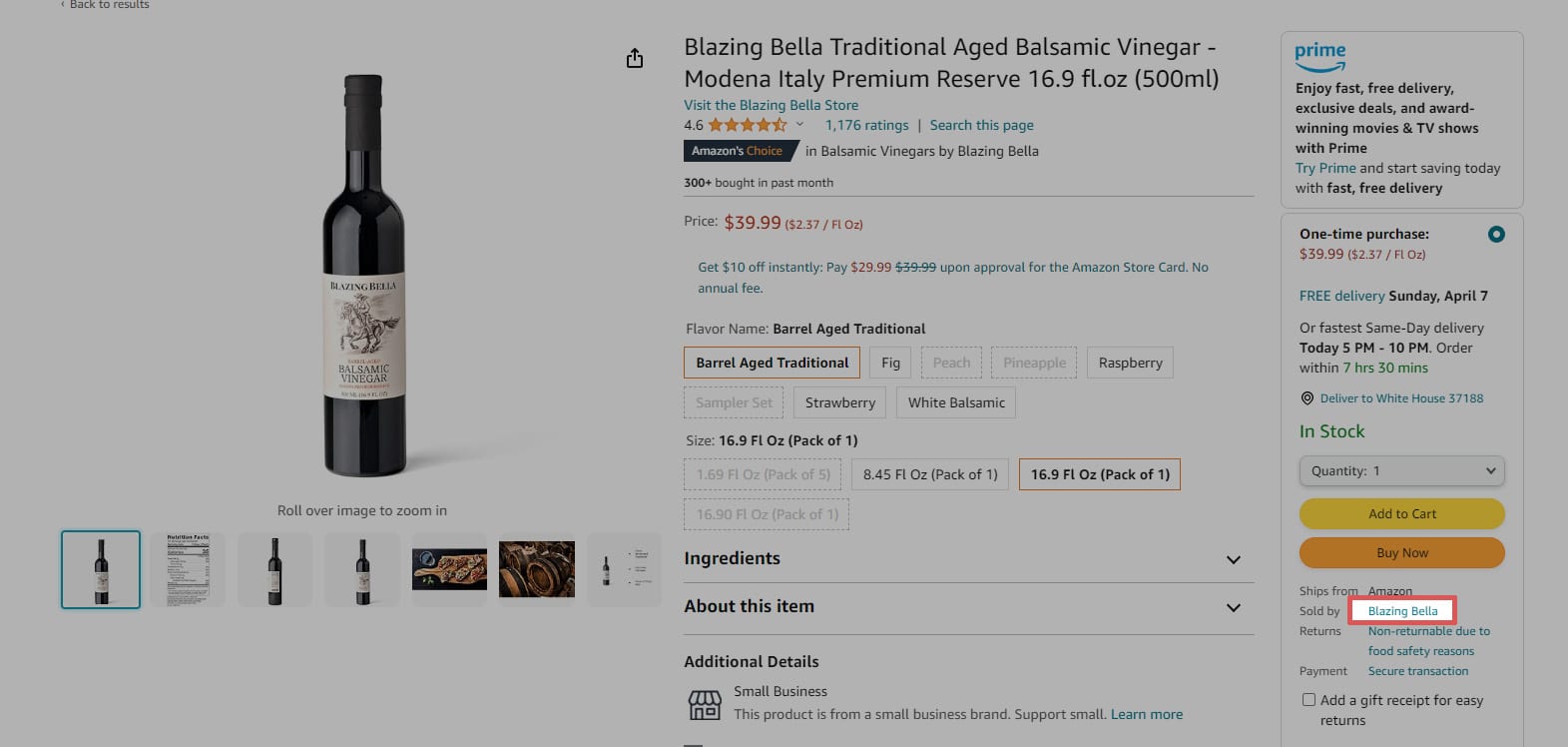
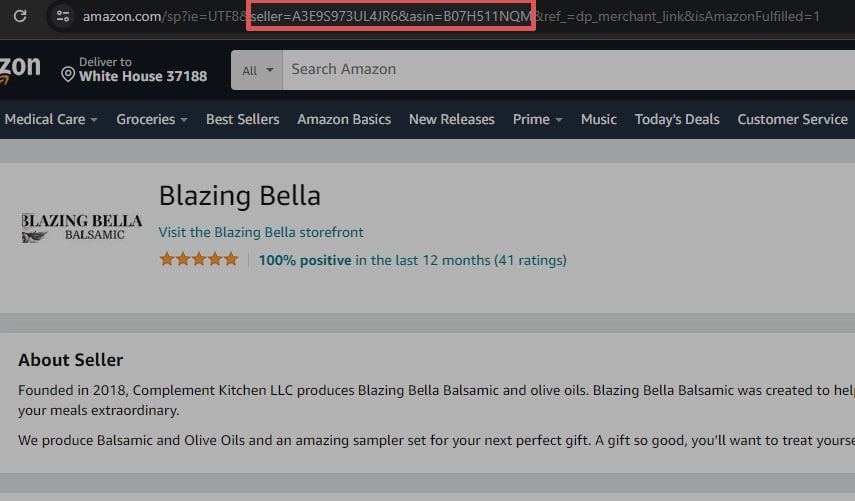
Click Sold By [your company name] to view your About Seller page. This page shows your Seller ID in the URL: seller=XXXXXXXXXXXXX
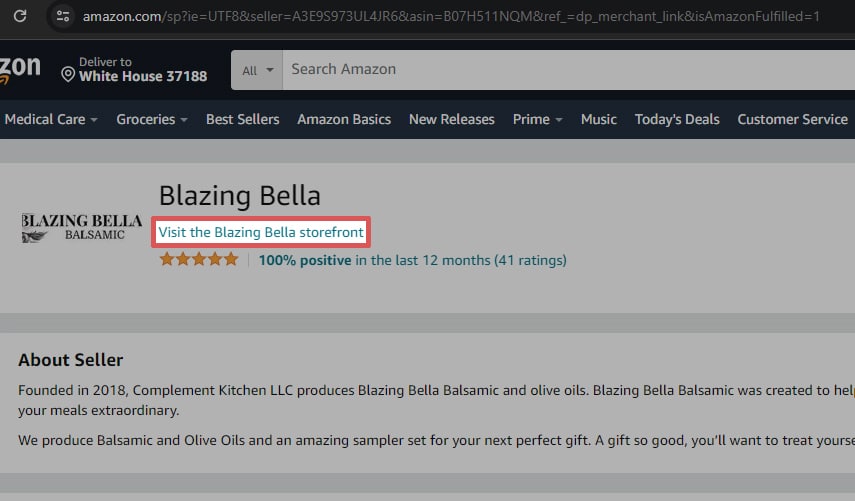
If you also need your Marketplace ID (which is your ID for each marketplace, i.e., Amazon.com, Amazon.ca, etc.), click on Visit [your company name] Storefront.
After clicking, you may need to wait for the next page to load so you can view your Seller ID in the URL.
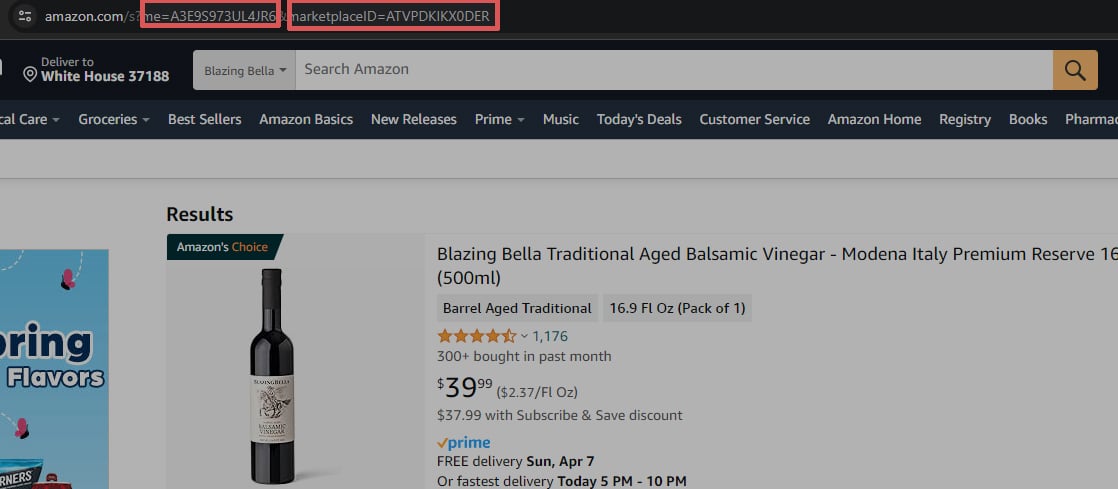
On this page, the URL will once again show your Seller ID: me=XXXXXXXXXXXXX. Following that is your Marketplace ID for that particular Marketplace: marketplaceID=XXXXXXXXXXXXX
Related Amazon How-To Articles
Gourmet Ads: Revolutionize Your Amazon Strategy
Since 2008, Gourmet Ads has excelled in Digital Advertising for Food, Beverage and Supermarket brands. As a Verified Amazon Ads Partner, we’re here to elevate Amazon Sellers.

Ready to transform your Amazon sales metrics?
Explore Gourmet Ads’ Amazon Advertising Services and discover how our expertise can skyrocket your food brand’s performance on Amazon. We’re dedicated to enhancing your visibility, driving sales efficiency, and ensuring your advertising budget yields maximum profitability.
Dive into the world of optimized Amazon advertising with Gourmet Ads today.